Wan 2.7 Review (2026): An Unbiased Real-World Test of the Cinematic AI Video Generator
Reviewed by Wan 2.7 Editorial Team · Published: March 2026 · Updated: April 2026 · Read time: 12 min
AI video generation has exploded in 2026, but one model has fundamentally changed how creators approach production: Wan 2.7.
What is Wan 2.7? It is a production-ready, multimodal AI video model designed to combine text, images, and advanced frame-level controls to generate cinematic 1080P clips. Unlike older "slot machine" AI tools where you type a prompt and pray for a good result, Wan 2.7 introduces Native Audio Synthesis, Start/End Frame Guidance, and strict Subject Cloning.
In this review, we tested the model across cinematic storytelling, high-motion physics, multi-shot consistency, and audio-sync. The ultimate question: Is Wan 2.7 the best AI video generator of 2026? For the full overview, visit the Wan 2.7 AI video generator main page.
1. The Quick Verdict (TL;DR)
If you want the most creatively controllable AI video generator on the market right now, Wan 2.7 is an absolute powerhouse. It trades the wild unpredictability of early AI models for strict director-level control, native audio, and flawless 1080P resolution.
Overall Score: 4.6/5 (9.2/10)
| Dimension | Score | Notes |
|---|---|---|
| Visual Quality | 9.5/10 | Crisp 1080P and stable cinematic lighting. |
| Creative Control | 9.5/10 | Excellent Start/End frame and shot control. |
| Speed | 8.5/10 | Fast in priority queue, slower at peak times. |
| Value for Money | 9.0/10 | Strong ROI with non-expiring credits. |
| Ease of Use | 8.0/10 | Simple UI, advanced prompting takes practice. |
Pros
- Native Synchronized Audio: Generates flawless soundscapes and foley effects concurrently with the video.
- Start/End Frame Guidance: Dictate exactly how your scene begins and resolves.
- Subject & Voice Cloning: Locks in character identity across entirely different scenes.
- Subscription-Free: One-time credit purchases that never expire, complete with commercial rights.
Cons
- Steeper Prompting Curve: Requires structured, cinematic prompt formulas to get the best results.
- Desktop-Heavy UI: Managing complex 3x3 grids and multi-frame inputs is cumbersome on mobile devices.
Want to test it yourself? Read the Wan 2.7 Prompt Guide to get started.
2. How We Tested Wan 2.7 (Methodology)
To ensure this review is reproducible, unbiased, and grounded in real-world production standards, we established a strict testing environment. We did not just watch the official demos; we pushed the engine to its breaking point.
Test Environment
- Duration: 15+ hours of intensive hands-on testing.
- Credits Used: Over 1,500 credits consumed across 80+ generations.
- Platform: Wan 2.7 Web Interface (Plus Plan with Priority Queue).
- Test Date: March 2026.
Evaluation Criteria
We rated Wan 2.7 strictly on: motion physics and temporal consistency, prompt adherence, camera stability, native audio synchronization, character identity locking, and overall value for money.
3. Real Generation Showcases
Below are real test runs we conducted. We have included the exact prompts we used, the parameters, and our author notes on what worked and where the model struggled.
Test 1: Text-to-Video with Native Audio
Test 1: Electric Pickup Transformation Flight
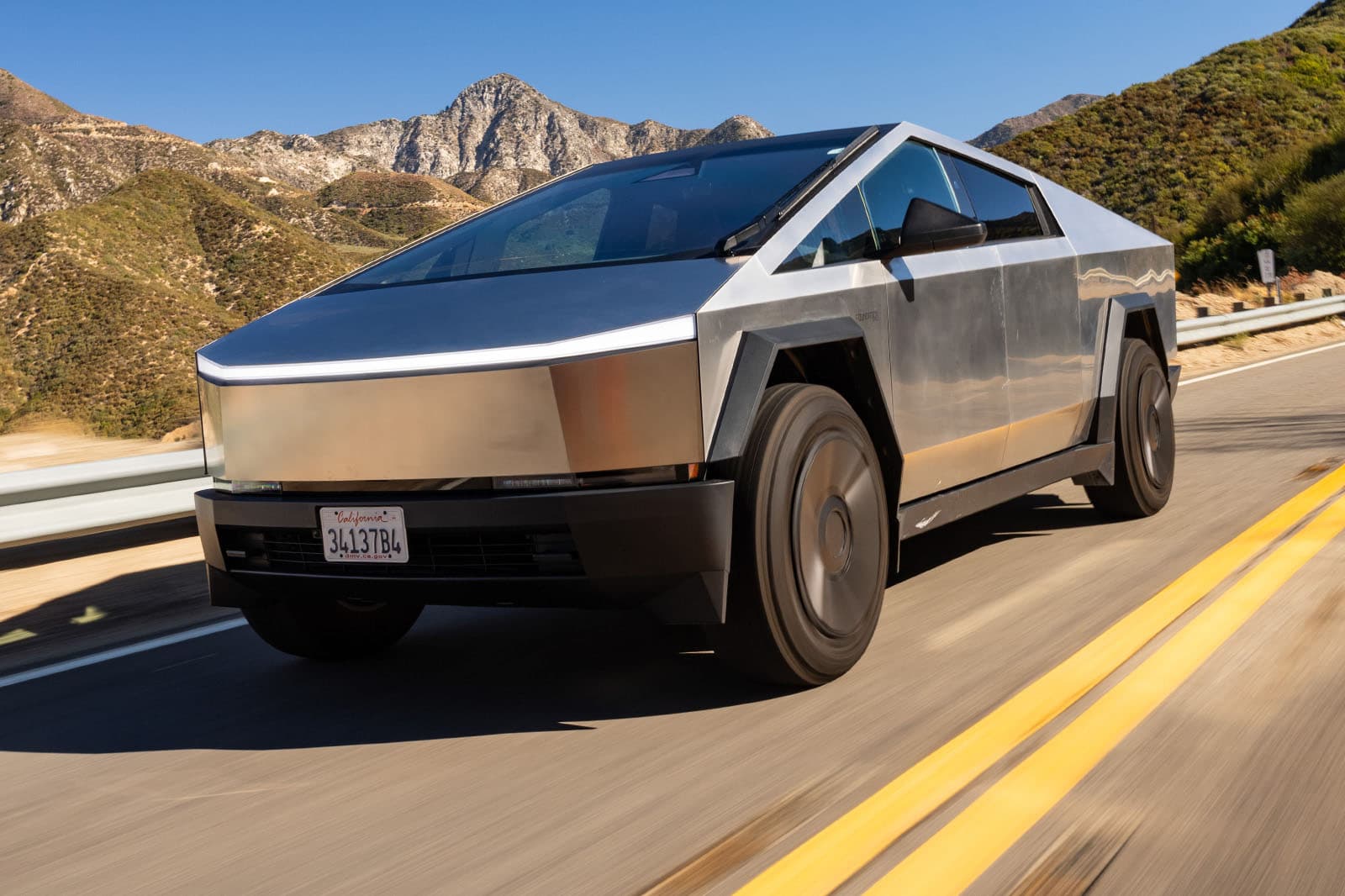
Prompt
@Image1 as the first frame reference. Maintain the same vehicle design and environment consistency during transformation. [00:00–00:04] Shot 1 — High-Speed Establishing Shot Wide cinematic tracking shot beginning from @Image1. A futuristic angular electric pickup truck speeds down a sunlit mountain highway. The camera tracks low near the front wheel while the road blurs beneath. Sunlight reflects off the brushed metal body panels. Wind rushes past as the vehicle accelerates through the curve of the road. [00:04–00:08] Shot 2 — Mechanical Transformation The camera moves to a dynamic side orbit shot while the vehicle suddenly begins transforming. Panels split and rotate with precise mechanical motion. Wheels fold inward, metallic plates shift and lock into place. The truck rapidly unfolds into a towering armored robot standing on the highway. Pistons move, glowing energy lines appear between metal segments, dust blowing across the road. [00:08–00:12] Shot 3 — Rocket Launch Low-angle heroic shot of the armored robot. Thrusters ignite from its back with bright blue flames. The robot crouches then launches upward powerfully, blasting debris and dust from the asphalt. The camera tilts upward as the robot rockets toward the sky, leaving a fiery exhaust trail. [00:12–00:15] Shot 4 — Jet Transformation in the Sky High-altitude aerial shot above the mountains. Mid-flight the robot rapidly folds and reconfigures again. Armor panels streamline and wings deploy, forming a sleek futuristic jet fighter. The jet ignites its engines and streaks across the sky at extreme speed, leaving a glowing contrail behind. Audio: Cinematic sci-fi transformation sounds, heavy metallic shifting, rocket ignition blast, followed by powerful jet engine roar with epic cinematic background music.

Author Note: This run keeps strong motion coherence across quick cuts and high-speed downhill action. Snow spray, camera spins, and freestyle tricks stay readable while preserving cinematic framing and energetic pacing.
Test 2: Text-to-Video (No Input Image)
Goal: Test multi-location scene continuity, seamless match cuts, and wardrobe morphing using prompt-only generation.
Prompt
Live-action, Cinematic 4K, 15s, 60fps. Core Motion: Continuous 360-degree circular orbit at waist height. Seamless match cuts occur every 3 seconds as the camera passes behind the subject's back. Scene Breakdown: 0:00–0:03 | London, UK: The camera orbits a stylish woman in a classic tan trench coat and leather boots. Background: The Big Ben and Westminster Bridge during a soft golden hour. She adjusts her sunglasses with a confident smile. 0:03–0:06 | Santorini, Greece: Match cut behind the back. Transition to a vibrant blue and white environment. She now wears a flowing white silk sundress. Background: Iconic blue-domed churches and the Aegean Sea. She takes a light, airy step forward. 0:06–0:09 | Huacachina, Peru: Match cut behind the back. Transition to a dramatic desert oasis. Her outfit transforms into an earthy-toned linen set with a wide-brimmed hat. Background: Towering sand dunes and a hidden lagoon. Wind catches her hair. 0:09–0:12 | Chengdu, China: Match cut behind the back. Transition to a high-energy urban night. She wears sleek, reflective cyberpunk-style techwear. Background: Massive 3D LED billboards and neon-lit crowds of Taikoo Li. She performs a subtle, rhythmic shoulder turn. 0:12–0:15 | Blue Lagoon, Iceland: Final match cut. Transition to a surreal volcanic landscape. Her outfit becomes a high-fashion faux-fur coat in icy blue. Background: Steaming turquoise thermal waters and black basalt rocks. She finishes by looking directly into the lens as the orbit completes. Technical Style: Continuous orbital movement, gimbal-stabilized cinematography, high-speed shutter for crisp motion, professional travel influencer aesthetic, seamless wardrobe morphing, color-graded to match each location's unique atmosphere.
Author Note: This prompt-only run delivers clean orbital continuity with stable subject identity across five locations. The behind-the-back transitions remain readable, and costume/environment shifts feel intentional rather than chaotic.
Test 3: Subject Reference Cloning
Goal: Test character consistency across different environments.
Test 3: Tunnel Truck Pursuit and Takeover
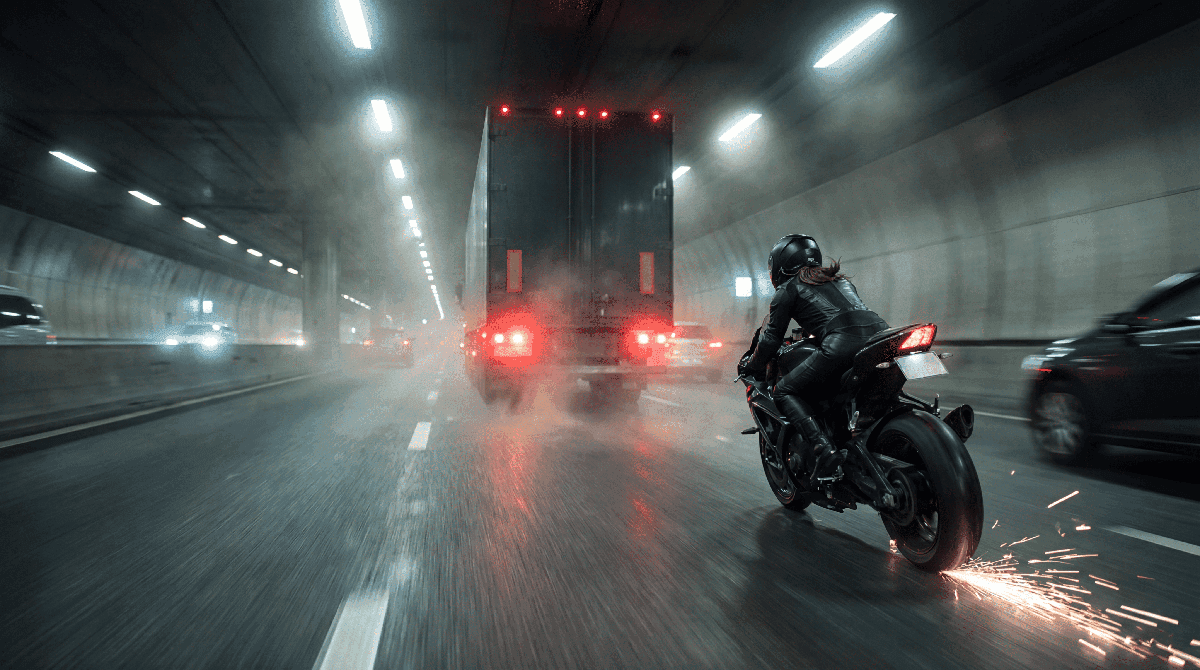
Prompt
@Image1 as the first frame reference. Maintain consistent biker appearance, motorcycle design, truck, and tunnel environment. [00:00–00:04] Shot 1 — High-Speed Pursuit Wide rear tracking shot beginning from @Image1. A black-clad biker races through a misty highway tunnel at extreme speed, sparks flying as the bike leans dangerously close to the asphalt. The large cargo truck ahead barrels through traffic. The camera follows tightly behind the biker while tunnel lights streak overhead. [00:04–00:07] Shot 2 — Driver Perspective Dynamic camera shift to the truck driver’s perspective through the side mirror. The biker rapidly closes the distance, weaving between cars. The camera pushes in toward the mirror reflection showing the biker accelerating with aggressive precision. [00:07–00:10] Shot 3 — Aerial Tunnel View Cut to a dramatic aerial shot inside the tunnel. The truck speeds forward while the motorcycle darts through traffic behind it. The biker suddenly accelerates hard, moving into position directly behind the truck’s rear doors. [00:10–00:13] Shot 4 — Motorcycle Leap Side tracking shot. The biker stands slightly on the foot pegs, launches off the speeding motorcycle, and jumps toward the back of the truck. The bike continues sliding behind while sparks trail across the road. [00:13–00:15] Shot 5 — Truck Takeover Rear close-up shot. The biker grabs the truck’s rear handle and pulls herself onto the back platform. Inside the cab, the driver violently swerves the truck side-to-side trying to shake her off as tunnel lights flicker across the scene. Audio: Intense cinematic chase score, roaring motorcycle engine, heavy truck rumble, tire screeches, wind rush, metallic clanks during the jump and truck swerves.

Author Note: This reference-guided run preserves biker identity, motorcycle styling, and tunnel continuity across all five shots while maintaining readable high-speed action and strong cinematic momentum.
Want to steal our exact formulas? Read our Complete Wan 2.7 Prompt Guide.
4. How to Use Wan 2.7 (Quick Walkthrough)
Despite its advanced capabilities, Wan 2.7 features a highly intuitive 3-step workflow. Here is how you go from concept to cinematic export.
Step 1: Upload Reference Media (Optional but Recommended)
If you want precise control, start by uploading your assets.
- Use Image-to-Video to animate a specific photo.
- Use Start/End Frames to define the exact beginning and end of your shot.
- Use Subject Reference to lock in a specific character's face.
Step 2: Write a Structured Prompt
Wan 2.7 responds best to structured cinematic language rather than conversational text. Use the official formula:
Subject + Environment + Action + Camera Movement + Style + Lighting + Mood
(e.g., "A sports car driving through a desert highway, camera tracking alongside the car, dust rising from the road, golden hour lighting.")
Step 3: Set Parameters & Generate
Select your aspect ratio (16:9 for YouTube, 9:16 for TikTok), choose your duration (from 2 to 15 seconds), and hit Generate. We highly recommend using the 3x3 Grid Workflow, which generates 9 low-res motion variations so you can pick the perfect trajectory before spending credits on a 1080P upscale.
5. Deep Dive: Key Features
What makes Wan 2.7 different from its predecessors (Wan 2.5 and 2.6)? Here is a breakdown of the core engine upgrades based on our testing.
Native Audio-Visual Synchronization
This is the feature that changes the industry. Wan 2.7 does not just generate pixels; it generates sound waves. By analyzing the physical actions in your prompt (e.g., \"glass shattering\", \"heavy footsteps on snow\"), the model's native audio engine synthesizes perfectly timed foley and ambient soundscapes.
Advanced Frame-Level Precision
The introduction of Start Frame and End Frame inputs effectively turns Wan 2.7 into an animatics engine. You are no longer at the mercy of the AI deciding how a scene resolves. You dictate the exact composition of the final frame, making multi-shot storytelling a reality.
Realistic 1080P Output & Flexible Duration
While many models upscale 720p outputs, Wan 2.7 processes natively in 1080P. Furthermore, it supports dynamic narrative pacing, allowing creators to generate snappy 2-second social media hooks or extended 15-second cinematic sequences without the physics breaking down in the final seconds.
6. Pricing & Value for Money
Unlike competitors that force you into restrictive monthly subscriptions, Wan 2.7 utilizes a transparent, One-Time Access credit system. Your credits never expire, and you only pay for what you use.
| Plan | Price | Credits | Best For | Core Features |
|---|---|---|---|---|
| Starter | $9.9 | 100 | Beginners | 720p export, standard queue, commercial license. |
| Basic | $29.9 | 330 | Daily Creators | 1080p export, priority queue, native audio. |
| Plus | $49.9 | 600 | Power Users | Up to 5 concurrent jobs, faster priority queue. (Most Popular) |
| Professional | $99.9 | 1250 | Studios/Agencies | Up to 10 concurrent jobs, bulk processing, 24/7 support. |
Cost Per Generation Analysis
Generating a high-definition, 5-second 1080P video with native audio typically consumes between 5 to 8 credits. On the Plus plan, a single cinematic generation costs roughly $0.40 to $0.60. Given that every paid tier includes a Commercial Use License and No Watermark Downloads, the ROI for commercial projects is exceptionally high.
View the full Wan 2.7 Pricing Plans.
7. Alternatives & Competitors
If Wan 2.7 is your current frontrunner, the next logical question is whether Sora 2 or Kling 2.6 might be a better fit for your workflow. The comparison below focuses on practical production criteria: controllability, consistency, audio readiness, and speed-to-delivery.
| Quality Dimension | Wan 2.7 | Sora 2 | Kling 2.6 | Notes |
|---|---|---|---|---|
| Creative Control | 5/5 | 3/5 | 4/5 | Wan 2.7 leads with Start/End Frame guidance and tighter shot steering. |
| Audio-Ready Workflow | 5/5 | 4/5 | 3/5 | Wan 2.7 reduces post-production work with native synchronized audio output. |
| Motion Physics | 4/5 | 5/5 | 5/5 | Sora 2 and Kling 2.6 remain very strong in fast motion and dynamic scene flow. |
| Character Consistency | 5/5 | 4/5 | 4/5 | Wan 2.7 is more reliable across multi-shot narrative sequences and reference-based identity locking. |
| Ease of Use | 3/5 | 4/5 | 4/5 | Wan 2.7 has more controls, but that also adds setup complexity for newer users. |
7.1 Wan 2.7 vs. Sora 2: Which One is Better for Production?
This matchup is about creative direction versus pure simulation quality. Both models can produce premium visuals, but they prioritize different strengths.
The Test Prompt: "A cinematic close-up of a vintage wristwatch falling onto a wet black marble floor in slow motion. Water droplets splash outward on impact, the glass face cracks, and tiny metal fragments scatter under dramatic side lighting. The camera stays locked in a low-angle macro shot as reflections ripple across the wet surface. Native sound of the impact, glass cracking, and water splashing should feel tightly synchronized with the motion."
Wan 2.7
Sora 2
Wan 2.7 Result: Better shot-level control, cleaner staging, and easier integration when audio timing matters in final edits.
Competitor Result: Stronger raw physics and more naturally emergent fracture behavior in high-detail motion tests.
The Verdict: Pick Wan 2.7 for controllable production workflows; pick Sora 2 for maximum physical realism in single-shot showcases.
Explore the : Wan 2.7 vs Sora 2 comparison.
7.2 Wan 2.7 vs. Kling 2.6: Which One is Better for Production?
This comparison focuses on motion smoothness, cinematic continuity, and how well each model handles action-heavy scenes under practical production constraints.
The Test Prompt: "A young woman in a red leather jacket runs through a neon-lit rainy street at night while the camera tracks closely behind her, then swings around into a front-facing close-up as she turns into a narrow alley. Reflections shimmer on the wet pavement, city signs flicker in the background, and her face, hairstyle, and outfit must remain perfectly consistent throughout the sequence. Add tense ambient city sound, footsteps splashing through puddles, and distant traffic noise."
Wan 2.7
Kling 2.6
Wan 2.7 Result: More dependable identity locking across shots, stronger directability with reference-based workflows, and better fit for creators who need repeatable commercial outputs.
Competitor Result: Kling 2.6 shows very fluid motion and strong cinematic pacing, especially in movement-heavy sequences. It feels fast, visually smooth, and often requires less setup effort.
The Verdict: Choose Wan 2.7 if you value character consistency, audio-ready delivery, and structured control. Choose Kling 2.6 if you prioritize motion smoothness, faster ideation, and high-energy visual flow.
Explore the Wan 2.7 vs Kling 2.6 comparison.
7.3 Wan 2.7 vs. Seedance 2.0: Which One is Better for Production?
This comparison is about structured cinematic production versus flexible multimodal exploration. Both models can support creative video workflows, but they tend to serve different creator priorities.
The Test Prompt: "A premium skincare bottle rotates slowly on a reflective stone pedestal in a softly lit studio. Water droplets slide down the glass surface while delicate mist drifts through the background. The camera begins with a macro close-up of the bottle cap, then pulls back into a smooth three-quarter product shot. Lighting should feel elegant and commercial, with strong material detail, clean reflections, and a polished luxury-ad aesthetic."
Wan 2.7
Seedance 2.0
Wan 2.7 Result
Better shot structure, stronger camera intentionality, and more reliable output when the goal is polished commercial delivery. It feels easier to direct toward repeatable branded visuals and more consistent scene composition.
Competitor Result
Seedance 2.0 performs well when the goal is multimodal experimentation, concept exploration, and flexible visual ideation. It can be attractive for creators who want to try different stylistic directions quickly without over-optimizing for strict production repeatability.
The Verdict
Choose Wan 2.7 if you need stronger control, cleaner product-style staging, and more production-ready output. Choose Seedance 2.0 if you prioritize creative experimentation, flexible visual exploration, and early-stage concept development.
Explore the Wan 2.7 vs Seedance 2.0 comparison.
7.4 Wan 2.7 vs Wan 2.6 vs Wan 2.5
Version takeaway
Wan 2.7 is the most advanced and production-ready version in the Wan lineup, with stronger creative control, better identity consistency, and a workflow that feels more usable for real commercial output.
Compared with Wan 2.6
Wan 2.7 feels more mature in scene planning, reference-driven consistency, and overall directability. It is the better choice for creators who need repeatable results across campaigns, story-driven clips, or multi-step production workflows.
Compared with Wan 2.5
The gap is more noticeable: Wan 2.7 offers a more refined generation experience, better continuity across shots, and stronger output quality for creators who need polished video rather than rough concept drafts.
Recommendation
Wan 2.6 is still useful for understanding the previous generation workflow, and Wan 2.5 remains relevant as legacy context for capability comparisons. But for most creators starting fresh today, Wan 2.7 is the version we recommend first.
| Version | Best For | Main Strength | Recommendation |
|---|---|---|---|
| Wan 2.7 | Commercial storytelling, multi-shot production | Best control and consistency | Recommended for most users |
| Wan 2.6 | Previous-generation workflow comparison | Good balance of control and usability | Useful for upgrade comparison |
| Wan 2.5 | Legacy reference and historical comparison | Earlier model context | Mainly useful for version history |
Best Alternatives if Wan 2.7 Is Not Right for You
If your priority is peak physics realism, evaluate Sora 2 first. If your priority is fluid cinematic motion and faster concept generation, Kling 2.6 may fit better. For a broader decision tree by use case and budget, use our alternatives guide.
8. Final Conclusion: Should You Use It?
Wan 2.7 is a definitive "Yes" for serious creators.
Why it stands out
It represents a major maturity milestone in the generative AI space. By focusing on control, consistency, and native audio, Wan AI has built a tool that actually fits into a traditional video production pipeline.
Best fit creators
If you are a YouTuber, an indie filmmaker, or a digital marketer tired of AI videos that "look cool but are completely unusable for client work," Wan 2.7 is the engine you've been waiting for.
Recommended plan
We highly recommend grabbing the Basic ($29.9) or Plus ($49.9) tier to unlock 1080P and concurrent generation. Visit the Wan 2.7 Pricing Plans page for full details.
9. Frequently Asked Questions
What is Wan 2.7 AI Video Generator?
Wan 2.7 is an advanced, multimodal AI model designed to create cinematic videos from text prompts or images. It features realistic motion, temporally consistent scenes, native audio synthesis, and highly controllable visual styles.
Are videos generated with Wan 2.7 completely free for commercial use?
Yes. All paid tiers (from the $9.9 Starter to the $99.9 Professional plan) include a commercial use license. You can legally use the outputs for YouTube monetization, client ads, and marketing.
Do the downloaded videos contain any watermarks?
No. As long as you are using any of the paid credit packs, your video exports will have absolutely no watermarks.
What video resolution and duration does Wan 2.7 support?
Wan 2.7 natively supports stunning 1080P resolution (available on Basic plans and above). You can customize dynamic video durations ranging from 2 to 15 seconds.
Will I lose my credits if I don't use them within a month?
No. Wan 2.7 operates on a flexible "One-Time Access" system. The credits you purchase never expire.
Can Wan 2.7 maintain character consistency in videos?
Yes. Wan 2.7 features advanced Subject & Voice Reference Cloning designed to lock in visual identity across different camera shots and lighting conditions.
Is Wan 2.7 better than Wan 2.6?
For most creators, yes. Wan 2.7 offers stronger control, better consistency, and a more production-ready workflow than Wan 2.6.